PDF watermark/background Rendering Extension for SSRS – Part 2

Updated 2011-02-22: the underlying Stream is closed when PdfWriter.Close() is called, so the code for the PdfHandler.AddBackgroundPdf() method is updated (line 79 and further).

Well, I didn’t think this follow-up to Part 1 would come this quick, but here it is! Again I would like to emphasize that Jan Hoefnagels is the one who should take credit for this solution, but he isn’t the blog-writing type of guy. He’s not even a “Getting Things Done” guy. He’s a “Making Things Work” guy. And he’s pretty good at that.

Anyway, Part 1 showed you a general solution for an implementation of a Rendering Extension for SQL Server Reporting Services that was able to utilize the built-in (Microsoft provided) PDF Renderer, while enabling you to get the rendered PDF and do “something” with it, before sending it back to the SSRS server, which would subsequently send it to the end-user as a downloadable PDF file. That was a long sentence by English standards, but by Dutch standards, that’s kind of like a normal length. In German however, you would just be getting started. This whole article could be one sentence in German and still leave room for more.

Continue reading PDF watermark/background Rendering Extension for SSRS – Part 2

PDF watermark/background Rendering Extension for SSRS – Part 1

While working on a Dynamics CRM implementation for Valx —whose website was made by Jan, Zlatan and me with Umbraco— with my dear friend and “colleague” Jan Hoefnagels, we stumbled upon a technological hurdle.

We promised our client quotes, orders and invoices —as generated by SQL Server Reporting Services, which is neatly integrated into Dynamics CRM— with and without their own letter background, so they could use the same reports for printing on pre-printed paper (no background), as well as send the PDF through email to their clients (with background). Continue reading PDF watermark/background Rendering Extension for SSRS – Part 1

NL Weerradar widget en Snow Leopard: hulp gevraagd!

Gebruiker Dave meldt net dat de NL Weerradar widget niet goed werkt onder de nieuwste versie van Mac OS X, Snow Leopard.
Mocht je hetzelfde ondervinden en je kent de weg in Mac OS X, dan stel ik het zeer op prijs wanneer je de zeer waarschijnlijk aanwezige foutmelding in de Console, in de vorm van:
24-08-09 14:46:02 [0x0-0xc00c].com.apple.dock[257] Melding.....
hieronder in de comments zou kunnen plaatsen.

Zo kan er zo snel mogelijk weer gebruik worden gemaakt van de NL Weerradar widget onder Snow Leopard!

Nieuwe widget: Brandstofprijzen

Het was weer tijd voor een nieuwe widget, ditmaal één gericht op de Nederlandse Mac gebruikers. Ik maak al een tijdje gebruik van de website van Athlon Car Lease, “Goedkoper Tanken”, waarvan de prijsgegevens volgens hen afkomstig zijn van de vloot leaserijders die met een tankpas tankt. Ik vind het in ieder geval de meest betrouwbare site m.b.t. de prijs van brandstofgegevens. Wat miste was een eenvoudige interface met link naar Google Maps.

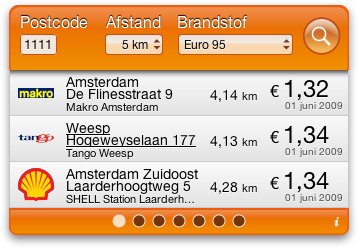
Die is er nu voor Mac OS X Dashboard: de Brandstofprijzen Widget.
Brandstofprijzen Widget

Geef de postcode, de afstand en het brandstoftype op en de widget haalt de gegevens op en presenteert de resultaten overzichtelijk. Bladeren door de resultaten gaat d.m.v. de knopjes onderaan. Klikken op het adres opent de locatie op Google Maps. De resultaten zijn voorzien van de logo’s van de bekende tankstations.

De ingevoerde gegevens en de laatste zoekresultaten worden bewaard, zodat deze ook na een herstart van de computer of de widget direct beschikbaar zijn.

Downloaden van de widget en commentaar op de pagina van de Brandstofprijzen Widget!

Euro Stocks widget version 1.5

After the appearance of some gibberish text on the widget, it was inevitably time to update. This is a minor update, just to get things going again.
In addition, user David B. mailed me in September already :S with a helpful addition: the ability to re-sort the stocks, using buttons on the back of the widget. This functionality is now included.

Download version 1.5 of the Euro Stocks widget.

For comments, please go to the Euro Stocks widget’s page!

Enjoy!

Note to users who update. Please write down the codes of your indices/stocks/funds before you update! Due to a design decision made earlier (to allow multiple instances of the widget, all with their own preferences) and the fact that Apple doesn’t provide a way to keep the unique widgetID between updates, the preferences of your widget won’t be retained between updates.

NL Weerradar widget versie 2.2

Aan de NL Weerradar widget zijn nu de contourkaarten van het KNMI toegevoegd, waarop de temperatuur, het zicht en de windsnelheden te zien zijn.
Daarnaast is een bug verholpen, waarbij het selectiemenu niet meer werkt wanneer er geen verbinding kan worden gemaakt met de server. Verder is het icoon vernieuwd.

Downloaden van NL Weerradar Widget versie 2.2

Commentaar op de widget gelieve op de pagina van NL Weerradar widget zelf!

The undocumented Dashboard features and quirks

Let me start by saying that Apple’s inclusion of the Dashboard, starting with Tiger (Mac OS X 10.4), has had an enormous influence on me. It was the first time I actually wrote a small “program” in HTML and javascript. The Dashboard really is a great platform to develop for, as it encourages you to make small, lean and focussed little programs, that are very good at doing one thing.

Dashboard’s behaviour (expressed through methods and properties) is farely well documented, but I’ve been breaking my head over a number of things, which I eventually had to find out through trial and error. Had they been included in the official Dashboard reference

Below is a list of the quirky behaviour I’ve encountered while developing the widgets on this site.

  • widget.onshow fires on: showing the Dashboard (documented), placing a new instance on the Dashboard (undocumented). The latter undocumented feature would also fire when the widget would be “installed” or “replaced”, which I believe is similar to placing a new instance.
  • reloading (CMD+R) the widget is apparently not the same as placing a new instance on the Dashboard, as widget.onshow is not fired. (undocumented)
  • widget.onremove fires when a widget is replaced with (another version of) the same widget. Not so handy when you use the widget.identifier to allow for multiple instances of the same widget, all with their own preferences. (undocumented)
  • the widget.identifier is not retained when a widget is replaced with (another version of) the same widget. Moreover, when multiple instances are present at one time, they are all replaced by one (in total) virgin instance. Again, not so handy (see previous remark) (undocumented)

So, I hope this info will somehow either be included with the official documentation (I’ve filed a feedback report at Apple’s website) or you’ll be able to find it here.