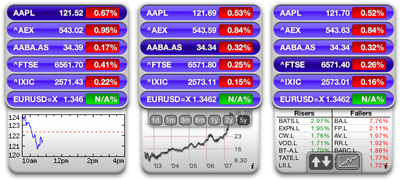
Euro Stocks Widget
Note to users who update. Please write down the codes of your indices/stocks/funds before you update! Due to a design decision made earlier (to allow multiple instances of the widget, all with their own preferences) and the fact that Apple doesn’t provide a way to keep the unique widgetID between updates, the preferences of your widget won’t be retained between updates. I’m currently looking for a way to allow both (multiple instances and between-update-preferences).
The Euro Stocks widget.
Current version: 1.6
Download the widget here.
«Source available on GitHub»
Requires Mac OS X 10.4.3 or higher (Tiger, Leopard, Snow Leopard & Lion).

Features:
- All stocks, funds and indices that are featured on Yahoo! Finance can be shown.
- Shows the current value, the absolute change or the relative change.
- Can show you the highest risers and lowest fallers of any index.
- Shows you the chart of the intraday results, of last month, three months, six months, one year, two years or five years. When available.
Changes:
Version 1.6
- Fixed deprecated Yahoo Finance URLs for data retrieval.
- Fixed intraday chart to use new format.
- Improved vertical grid label significance for values below 100.
Version 1.5
- Fixed gibberish text: Yahoo Finance changed an URL.
- Added: as contributed by user David B., a “move up/down” button on the back of the widget, to re-sort the existing stocks. Thanks David!
Version 1.4
- Changed uppercase to lowercase on front (to allow longer names)
- Fixed chart for Leopard
- Fixed fetching some stocks/funds that wouldn’t load (now using UK instead of global Yahoo! source)
- Known issue: “Done” button on back might appear wrong in Leopard
Version 1.2
- Added intraday chart.
- Added Risers/Fallers for indices.
Version 1.1
- Removed unnecessary input filter, any stock can be added now.
- The widget saves its preferences for every instance of itself. This means you can have as many instances of the widget opened at once as you like, they’ll all remember their settings.
- Warning! Because of the abovementioned “preferences by instance” the widget has to be reconfigured the first time it is used.
Screencast
In this screencast I’ll show you how you can use the widget. Have fun!
(Click to start playing)
You can find the original Euro Stocks widget here.
May 11th, 2007 at 15:03
I very much liked your Intraday option!
Will it return?
Groet, Jos
May 11th, 2007 at 15:30
It will return in the Euro Stocks Chart widget, which will be updated soon. The Euro Stocks Chart will be the descendant of the original Euro Stocks widget.
May 12th, 2007 at 9:31
Great widget, love it !
Problems : I follow some stocks/indices that don’t want to get inserted, exemples :
- ^GSPTSE (Toronto Index)
- ATD-B.TO (on the Toronto Index (.TO), the problem I think is that the “-” is not accepted in the name of the stock.
Suggestions :
1) With lots of stocks, couldn’t we specify a number of columns on which to display the stocks. You could then also enlarge the graph at the bottom to span all the columns. Because, with a lot of stocks, the widget gets bigger than the screen from top to bottom !!!
2) Manual re-ordering of the stocks in the list !
3) Code and Name, so you have the code to get the stock from the Web, and the Name to display in the widget.
That’s it for now.
Cheers,
Richard
May 12th, 2007 at 12:29
I have downloades the new v.1.0 but cannot ]realize hoiw is functions. For exemple I pit as on version 0.6 : CAC 40 ( for the french stock indice, click Add and nothing happens ( error in request). I try with APPL ( Apple) and same nmessage !!
May 12th, 2007 at 21:55
Dear Broes,
Your widget looks the part! Congratulations on the new GUI and functionality. I have just upgraded and am realy pleased with the configurability of the new version. However, I am unable to include the fund MFWGWMA.L, which is the EURO version of MFWGW.L (DOLLAR). Maybe something to look at for the new next release?
Regards,
Edwin Schouten.
p.s.
I’m also looking forward to the intraday chart!
May 12th, 2007 at 21:59
Small update: the fund MFWGW.L (DOLLAR) is accepted as fund by the widget, but when clicking on the fund to get the chart I get “Error in request”. Both funds aren’t working.
May 13th, 2007 at 10:00
Dear Broes,
This new version is great!
Now i can finally see all my national and international stocks and funds (dutch) in 1 place!! Great!!
Congratulations on this perfect widget..
Been looking for this for a long time…..
greetings
Paul
May 13th, 2007 at 20:49
In reply to the questions above (in no particular order):
It looks like I’ve made a mistake in preventing “wrong” codes to be added. I assumed that they all would be of the form ^abcde.fghij and as such filter some out. I’ll take the filter out.
It had passed my mind to make the widget “multiple instance able”, I just thought no-one would ever add so many stocks the widget would be too large. So, I guess I need to add that too…
Manual re-ordering is something for the future, don’t expect that very soon!
Code and Name, same story, wait and see!
May 15th, 2007 at 13:16
Congratulations and many thanks – Great widget!
Is it possible to add a widget with a similar functionality for warrants of citigroup (in german “Optionsscheine”)?
I would love to have that, too!
May 15th, 2007 at 13:16
Try to enter ^STOXX50E for DJ EURO STOXX 50 – but Euro Stocks won’t accept numbers? Thanks Martin
May 15th, 2007 at 15:07
Hi just downloaded your widget for the wirst time. I have Apple sticks inside, but unfortunately the price is only given in dollars. Is there no way to show it in euro. I mean the widget calls itself “euro stocks”
May 15th, 2007 at 15:53
great widget-thank you!
It would be good if I could insert numbers in the add-field. R6C.F is the Code for RoyalDutch/Shell in Frankfurt for example, but it doesn’t take it.
May 15th, 2007 at 19:04
Can anyone please tell me how to add a London Stock exchange stock. For example Northern Rock which is NRK.
May 15th, 2007 at 21:31
@John: Go to http://uk.finance.yahoo.com and search for NRK. Bingo: “NRK.L” Works like a charm! Happy moneymaking!
@Nico: I won’t add a dollar to euro conversion as I don’t see any logic in converting an U.S. listed stock’ value to Euros. The widget is named “Euro Stocks” for the sole reason that is able to display just that: European listed stocks and indices (and incidentally U.S. listed stocks too).
May 15th, 2007 at 21:50
Thanks, works fine. Is there any chance in the future to be able to add quantities of shares held to be able to see an instant value to your portfiolio?
Thanks again
John
May 15th, 2007 at 21:53
Thanks that works fine.
Is there any chance in the future to be able to add quantities of stocks held to enable an instant portfolio valuation?
Thanks again
John
May 15th, 2007 at 22:06
@John: I might add that, it’s a great idea! Just wait for the update notification…
May 16th, 2007 at 0:35
Thank you Broes for your reply, but I Apple is also traded on european stock-markets. I mean not only is there the listing of the US Stock but every stock-makret are trading there own, for example drankfurt, xetra etc. I think it makes sense coz I usually check for my Apple Stcoks which I bought, and I bought them in Euro so I can see on the spot how my stocks perform.
May 16th, 2007 at 13:27
@Nico. Take a look at these search results: and you’ll see that when you choose for instance “APC.F” you’ll get the Frankfurt’ listed Apple stock in Euros. “AAPL” is Apple listed in the U.S.
May 16th, 2007 at 13:45
Beste,
Kan iemand mij zeggen hoe je deze kan invoeren in de widget aub ?
FR0010451203
of
PRXL.PSE
Mij lukt het niet.
Met de vorige versie lukte het wel.
Met dank voor uw tijd,
erik
May 16th, 2007 at 18:20
I tried to get CRES (Crescent Hydropolis) listed at London Stock Exchange but it says “error in request”. What´s that supposed to mean?
May 17th, 2007 at 11:04
For all questions concerning stocks that don’t work: please go to http://uk.finance.yahoo.com and search for the stock you’d like to see. For instance:
FR0010451203 is RXL.PA
Crescent Hydropolis (literal search!) is CRES.L
Et cetera
May 17th, 2007 at 12:07
It would be a nice feature that we can add ‘labels’ for each line ’cause the real name isn’t so easy to remember when you’re watching a lot of lines…
May 17th, 2007 at 12:11
Hi,
This is the first widget I try to install with Yahoo Widget XP.
Can anyone tell me how to proceed with the downloaded files ?
Cheers.
Bill
May 17th, 2007 at 12:32
Hi Et cetera,
thank you for your support. Good hint. Working now perfect.
Mike
May 23rd, 2007 at 11:31
Hi,
I got a problem with this new version (v 0.6 was great…). Well, when I settle the widget with my own stocks, it works well (still no intradays but, soon maybe…).
BUT when I quit the widget and reload it later, i found the first list, pre-loaded after the first install. Is there a way to save my preferences somewhere or is it a bug ?
thx
olivier
May 23rd, 2007 at 22:25
Thanks for the new version, it looks really great!
May 25th, 2007 at 6:57
Thanks for this widget, great for keeping an eye on my totally worthless stock options!
Downloaded the latest version and Stuffit tells me “the archive may be damaged.” Tried downloading again with the same result. Any help welcome.
Thanks
May 31st, 2007 at 7:29
Thanks ALOT. I’ve been waiting for a french quote widget for soooo long … It always make me very upset that Apple did not provide it within Mac OS X.
(I tried Yahoo widget but it didn’t convince me).
I also like the previous version and the indice graphics. You should provide make a fork for it I think.
Note that some stocks need an extension to work => http://uk.biz.yahoo.com/sd/index.html
June 27th, 2007 at 10:10
Hi,
Thx for you great job with this widget. BTW I still have a little problem with it.
When I settle the widget with my own stocks, it works well (still no intradays but soon maybe…).
BUT when I quit the widget and reload it later, i found the first list, pre-loaded after the first install. Is there a way to save my preferences somewhere or is it a bug ?
thx
olivier
June 27th, 2007 at 11:01
@Olivier
The behaviour of the widget is to save its preferences “per instance”. This means that you can open multiple copies of it and configure any copy of it at will, without influencing the preferences of the other opened copies. However, this means that when you actually close or quit a copy, its preferences are removed.
So, at this time, the way to keep your preferences is by not closing the widget.
This was typically a situation where one solution creates a new problem, I’ve made the widget “multiple instance-able” while losing the ability to save its preferences globally.
Second, you say you have no intraday charts? Are you sure you are now running version 1.2 of the widget? You can find this by going to the back of the widget and selecting/deselecting the “Check for updates”.
The intraday chart is fetched by selecting “1d” from the popup selection bar when you enter the graph area with your mouse (see the screencast above).
Hope this helps, I’m always trying to improve the widget. I’ll see what I can do with saving the widgets preferences through quits and reloads.
June 27th, 2007 at 22:17
Absolutely excellent widget, I’ve been waiting for ages for something that shows FTSE prices.
Can I make a suggestion that a little space is added between the time scale selector and the top of the chart as it currently covers the chart when you hover over it.
i.e. you can’t view different charts without moving mouse up and down each time to reveal the new chart.
June 28th, 2007 at 11:26
Yes, this is a very great widget.
I have it on my screen the whole day using the dashboard developer mode.
I would be happy though if the widget would update the data on a regular basis (once every x minutes). As it is, I have to click around so that it updates its data which really is quit a pity.
Otherwise it works perfectly.
June 28th, 2007 at 12:30
@Gary:
I know the interface isn’t quite optimised yet. I was already thinking of dropping the popup selection bar and including it statically like in the Apple Stocks widget. Just wait and see…
@Malibu:
That (regular updating) is what is kinda “not allowed” according to the Dashboard development guidelines. A widget should only become active and update upon Dashboard activation and should return to a state of sleep when hiding Dashboard. The way you’re using it is more like an application.
However, I’d seen the same problem when developing it, that’s why it updates all data (chart or risers/fallers and rates) when you click on any stock item (even the currently selected item).
June 28th, 2007 at 16:03
It is a great widget!
But after every update I have to re-enter the list of my stocks. It would be fine when the stock list can be kept.
July 23rd, 2007 at 20:59
Is there a widget that will take current stock values and work out the total value of your stocks by taking into account how many you have?
July 28th, 2007 at 10:26
hi,
I try to insert this fonds but it isn´t shown yet.
http://uk.finance.yahoo.com/q?s=IFDBVGB.MI
Why?
July 31st, 2007 at 13:37
Hi,
Very nice Widget! As I saw in the previous replies, a name instead of code would be great. Even manual input of the name would be enough (it’s not like I add dozens of items every day!)
August 1st, 2007 at 12:09
Hi, Very very useful; why don’t you do a Symbian version of your Widget. I think it would be useful also to have the possibility to add the amount and the price of the stocks so to have the calculation of the increase in value (% and number).
August 5th, 2007 at 20:53
Very nice widget ! Keep up the good work !
August 14th, 2007 at 20:10
Hi,
cool Widget. But one thing would great! As Pierre said, a name instead of the code would be fine.
Patrick
August 17th, 2007 at 11:55
Hi,
how can I adjust the width of the widge ?
Some of my stock names are too long and they overlap into the stock value.
thxs,
oliver
August 20th, 2007 at 10:46
hi,
I try to insert this funds but it isn´t shown yet.
http://uk.finance.yahoo.com/q?s=IFAZTR.MI
but
http://uk.finance.yahoo.com/q?s=AZM.MI
so i think that only stocks work? ( funds dont work? )
Why?
August 21st, 2007 at 13:32
Very nice – is there any way it can be displayed in GBP (£)??
September 27th, 2007 at 12:18
At last a European stocks widget! THANX!
Request for future features:
1) Option to display company names not just stock ticker
2) Percentage changes not just monetary changes
3) Prettier interface
October 25th, 2007 at 10:43
Is it compatible with Leopard?
October 29th, 2007 at 5:17
Very nice widget. But Leopard breaks it a little bit. When running it under Leopard the chart will be displayed much smaller than before in Tiger. Like 30-40% of the normal size. Very strange.
November 4th, 2007 at 10:36
Congratulations for the update, great widget, works fine with Leopard.
November 5th, 2007 at 9:28
Great widget, two reqquests :
- one week chart
- alerts up or down
November 21st, 2007 at 23:29
i’d like to go back to version 1.2 please can you either email it to me, or make it available for download on the site again. i’m sure the implementation for Leopard is required, but version 1.4 on os x 10.4.11 is now no longer showing one of my stocks and i am not keen on the implementation of lower case text. just giving some feedback, not complaints. i love this little widget (just loved version 1.2 more……. )
November 28th, 2007 at 19:44
Thanks very much, I found Euro Stocks yesterday, now I can see my stocks and share in one place. It is à useful work
Merci beaucoup
Gérard
December 4th, 2007 at 0:58
Hi Broes, Eurostocks Widget
Good widget but pls find a way of turning off the update dialogue that appears over the top of the widget when an update is available.
Could you add an extra selection – such as ‘Thanks – I’ll do it later (don’t tell me again)’
Otherwise the Widget is spoiled until the user is forced to take the update.
It feels like bad old Microsoft style design – sorry. Everything else is top class.
thanks,
Paul Ives
Exmouth, Devon
December 4th, 2007 at 10:24
Hi,
Thanks for a nice widget, i would like some way to be able to reorder/sort my stock codes by using a combination of up+down arrow keys/sort button. Otherwise keep up the good work!
Matt
December 22nd, 2007 at 11:14
Hello,
very good widget.
i have installed for my father. Very easy to use.
But can i suggest that we can assign a name to the value we want to follow.
EXAMPLE:i want to follow SUEZ broke value. But for my father, SZE.PA isn’t very easy to read. He will prefer toread the real name SUEZ instead of the code.
May be for another version ?
Regards
January 2nd, 2008 at 17:34
Hi Broes
I’m new in the financial market.
Would you please tell me what does all these words mean :
^aex, aaba.as, ^ftse…
Please tell me where i can find easily this type of information.
Thank you
January 26th, 2008 at 10:21
Hi,
Really fantastic widget !
But…
As said by many people before, a label or name instead of the financial code would be really appreciate since it is more clear when you’re watching many stocks (you don’t know exactly wich code is wich company)
The idea for the reordering stocks feature is great too (I miss it).
Congratulations for this great job !
May 8th, 2008 at 21:20
upgrade
May 27th, 2008 at 9:48
Please let me know how I can get the coding for paris stock excha
June 6th, 2008 at 12:26
Congratulations! Excellent widget and very useful.
As a suggestion, it would be great if one could name the stocks. After adding several stocks, from different markets I sometimes lose my self with the codes…
Once again, congratulations and thank you for this widget.
September 19th, 2008 at 14:17
For people wondering about the ticker codes (“^ftse” etc) – they are the codes from yahoo finance (http://finance.yahoo.com/) look up your stocks there.
November 11th, 2008 at 17:15
Great widget, I was waiting for this one for a long time, since there only was the us stock widget. Works marvellous. Thanks
November 19th, 2008 at 6:53
I loved the old version and was happy to go to the new one but I’m having problems with it…when I trigger the dashboard I find that some stocks are repeated (with different prices for the same stock!!) and some are missing. Sometimes if I exit dashboard and re-enter it goes back to being correct. But sometimes it doesn’t…it is very frustrating. Any idea how I can resolve this? Anyone else having the same problem? I am using Mac OS 10.5.5.
Thanks
November 23rd, 2008 at 19:46
Love the widget. A suggestion: Increase the contrast in colors between the selected stock (the one that the graph shows) and the others. It’s hard to tell right now which is active.
November 28th, 2008 at 17:22
Ugh, the new release looks buggy. It’s got an extra big turquoise-colored rectangle around it, mostly on the bottom (I have only two stocks showing), and the top of the graph is still covered by the stock names. Leopard with all updates applied.
January 27th, 2009 at 16:47
There seems to be a bug in v 1.4. When I bring up Dashboard, the initial display of the widget is gibberish. If I click on one of the listings, it resets.
January 27th, 2009 at 17:24
The gibberish only appears to have started in the last few days. I suspect a problem with good ol’ Yahoo rather than the widget itself. (It’s nice to discover that I’m not the only one seeing this, though!)
January 29th, 2009 at 22:30
I’ve been having the gibberish problem, too. I don’t remember when I first downloaded the broes.nl stock tracking widget, and it usually works well. But lately, sometimes, instead of coming up with ticker symbols and prices, the widget comes up with html code splashed all over it. When that happened last night, I tried (Command-R) refreshing the widget. This has worked in the past to fix the problem, but last night it appears to have caused my latest kernel panic. I’m not blaming the widget—I’ve been having a lot of kernel panics lately, and they can get triggered by anything from putting a DVD in the optical drive, to inserting a thumb drive into the USB port on the tower’s front, to launching Dashboard from an Exposé corner. I’m using Tiger 10.4.11 on a dual 2.7 GHz G5.
January 30th, 2009 at 16:23
[disclaimer]I understand that this is free and that a person really doesn’t have the right to complain about something they didn’t pay for. I’m only commenting to make the developer aware of an issue he/she may want to address in the future[/disclaimer]
Not thrilled that the update completely replaced the old version instead of, well, just updating it. Now I have to “rebuild” my portfolio. Kinda inconvenient.
Other than that, hats off.
January 30th, 2009 at 16:45
@Darthhillbilly
I’m fully aware of the issue, but haven’t found a way around it yet. Also see the note at the top of this page (which has been there for about a year now).
It comes down to the choice:
* Multiple instances: more than one copy of the widget can be opened, without overwriting the preferences of other copies. Preferences will be lost on update.
* One instance: every copy of the widget overwrites the preferences of all copies. Preferences however will be retained on update.
I’ve chosen to go for allowing “Multiple instances”.
I still think this is a major fault on Apple’s behalf and I’ve written to them about this multiple times. No answer, though.
You might wonder why I think this is Apple’s fault? Well, just observe what happens when you have multiple instances/copies of a widget active in your Dashboard and you “update” it. They’re all replaced by one instance. And this one “instance” has an entirely new “widget ID”, the ID that is used to store the preferences on a per-instance basis. No chance you’ll be able to retrieve those old preferences.
So, if you really would like to see this work different, send some feedback to Apple. In the meantime, I’ll try to find a solution that works around this error.
February 10th, 2009 at 0:42
Upgraded from v1.4 to v1.5 – doesn’t work now with my stocks (SBRY – J Sainsbury, DGO – Dragon Oil, SL – Standard Life). Can I go back to v1.4? Or am I missing something?
Regards
April 17th, 2009 at 15:47
Thanks for a great widget.
However, I will encourage you to look into a problem with certain stocks that has long names and high quotes.
Example: MAERSK-B.CO quoted at about 31000 right now.
The text simply don’t fit as the width of the widget is too small. Another widget doing pretty much the same as this one seem to cause the same problems.
April 30th, 2009 at 14:10
Hey,
Thanks for this widget, it’s great.
Do you have any idea why some of the intraday charts aren’t working anymore. It seems the data is actually there, but the scale is much too small, going from 0 to a little above the current price, which means everything is cramped up at the top. Happens for example with ubsn.vx or nesn.vx.
May 22nd, 2009 at 6:57
ver. 1.5 on my Tiger (10.4.11) MacBook doesn’t retain the stocks I add when I quit the widget and restart. It reverts back to the default aapl, ^aex, aaba.as and ^ftse. I can see in my ~/Library/Preferences that widget-eu.broes.widget.eurostocks.plist gets updated with my list of stocks while the widget is running and when I quit it. However, the next time I start the widget, the plist file gets overwritten with the defaults, obliterating the previously saved list of stocks.
June 1st, 2009 at 11:18
Congratulations Broes on a fantastic widget. Just updated and loving the new up/down order function.
Thanks again!
June 2nd, 2009 at 15:50
[...] First off, let me apologise to all the PC users out there, this post is all about a little piece of software for the Mac known as the Euro Stock Widget. [...]
June 8th, 2009 at 10:25
Is it possible to check the currency exchanges using this widget? I have looked for the code but cant find it? Any help? I want GBP/EUR is possible.
June 8th, 2009 at 13:44
Take for instance the GBP to EUR rate
So the code is “GPBEUR=X” (without the quotes).
July 13th, 2009 at 21:48
Some stock gives problems. It says “invalid ticker”. Can I choose an alternative?
The two are:
HEIJM.AS
BAMNB.AS
July 19th, 2009 at 16:35
I am tracking EURJPY=X, but the widget can only display a chart for 1 day, 2 years and 5 years. All other (for me more useful) options don’t work and produce the report “chart not available”. Why is that? Yahoo finance can perfectly display the charts.
July 19th, 2009 at 18:10
@Frank
As you can see on
http://uk.finance.yahoo.com/q?s=EURJPY%3DX&m=L&d=
In the left-side menu, there is no option “Historical prices” (as there is for other items, like e.g. “TOM2.AS”). This option is used by the widget, not directly, but the underlying CSV file download option. It just doesn’t exist for (most of the) currency rates. The data it receives for the 2y and 5y options in the widget is corrupt, but the widget can’t detect that.
The Yahoo charts are all “bitmap” charts, but apart from the 1day chart in the widget, the rest of the charts are drawn “live” in the widget. This essentially means that the widget, apart from the 1day/intraday chart, downloads a list of values and creates the chart itself.
So my apologies, but at this time the widget will not be able to provide you with the data you need, since Yahoo doesn’t provide the “historical prices” option for currencies.
July 19th, 2009 at 22:28
Thanks for the explaination. Too bad, but not your fault. I was hoping there is a way to display the data as in the interactive chart. There the data is available.
Btw, thanks for the great widget.
August 19th, 2009 at 20:01
The Euro Stocks widget seems te be frozen. I can not do anything with it, not even cmd-R works. I already deleted the .plist and downloaded fresh widgets. What to do?
August 19th, 2009 at 20:03
Sorry, It seems that a warning about slow flash was stopping the widget from being operated. Works fine now.
November 5th, 2009 at 10:55
Hi Broes. It seems like something has been changed in Yahoo making the kurves at the bottom invalid. The values for many of the stocks are simply not the correct value. The numeric values shows correctly.
Anything I can do to correct?
…thank you
Jesper
January 12th, 2010 at 6:55
Hi, thanks for the widget. A list of suggestions:
* when entering a stock, map the return key to the Add button and ensure the text field for the stock name is reselected (will make it easier to enter multiple stocks)
* reselect the stock when you move it up or down (easily allows you to move it a number of locations)
* display stock price and price change to tens of cents (many stocks only change by a fraction of a cent, but this information is currently lost)
* set background colour for stocks whose price has not changed to blue, for example, not green (then green will only indicate stocks that have risen)
However, I like it. It messed things up when I entered my stocks, but was able to re-enter them okay. Keep up the good work.
January 15th, 2010 at 3:19
Hi again,
I have been using the widget some more and have it running next to the Apple stocks widget.
The Apple widget also truncates stock prices to the nearest cent (Grrrr), however the calculations in the change in price seem to be performed on the RAW data, but the EuroStock widget seems to calculate this after the truncation. For example a stock opened at 0.044, dropped to 0.4 (I checked this from the exchange listing). The Apple widget reports a drop in price of 10%; the EuroStock widget says a change of 0% That is quite a difference. It looks like the 0.044 is first rounded to 0.04 then compared to the opening price.
I hope this helps.
March 8th, 2010 at 20:17
Hello and thank You very much for this very nice and useful widget.
I have two observations:
- I think it would be nice to have a weekly chart
- It would be interesting if stocks would sort automatically according to the change in percent: from the highest positive percent change (on top) to the lowest (on bottom). This way you could have at a glance a first impression of the general move of the followed stocks.
Nice work indeed. Keep going!
hvala, merci
alex, serbia
May 24th, 2010 at 11:20
great widget ….. but the fact I can’t delete aaba.as is a nuisance. Is there a solution?
October 1st, 2010 at 11:59
I was pleased to find this great widget as the standard Mac widget has stopped validating the tickers for any stocks. However, even though this widget displays the correct price, the change does not seem to reflect the movement for the day for stocks. It works for indices but not stocks – any ideas? Many thanks and keep up the good work!
October 1st, 2010 at 12:37
Regarding my earlier query, the problem seems to be with Yahoo! Finance being wrong. Is there a way of changing the source to, for example, Google? Many thanks.
October 1st, 2010 at 12:54
@Graham:
Right now, the widget is built around Yahoo Finance as a source. Hooking it up to Google would require a fair bit of work. I’ll look into what happened and see whether I can find some time to fix it.
Anyway, I appreciate your feedback!
November 17th, 2010 at 18:23
Same issue with Yahoo Finance! Very annoying. There site has been showing wrong Previous Days Close for a few weeks now. How can we get them to sort it?
January 14th, 2011 at 16:07
What is a good ticker to follow the price for crude oil?
January 28th, 2011 at 12:04
Can anyone help me fix this – since yesterday all my tickers have been replaced with TEMP with a price of 100 and a change of 10?
Many thanks
January 28th, 2011 at 13:06
Same here, only US quotes are working nothing EU
January 28th, 2011 at 13:16
@Graham, @Jean and others with “TEMP 100.00 10.00″ showing up.
I’ll have a look at it this weekend, it probably has something to do with Yahoo having changed something in their datafeed (which is a comma separated download). Might have to change to their (or Google’s) XML feeds.
January 28th, 2011 at 16:02
Same problem here. Temp 100.00 – change 10.00
Console message: 28/01/11 14.54.32 DashboardClient[272] -[WebUndefined callWebScriptMethod:withArguments:]: unrecognized selector sent to instance 0×115761200
…but only on one of our macs. The other is still fine. Same version (1.5) Euro stocks. Same OS – both Intels…
US stocks also not working on the mac with this issue. The charts seems to be online and indicates correct prices.
January 28th, 2011 at 16:18
@Borbye
Well, one tip: don’t reload the widget or restart your Mac :S. That’s when the “TEMP 100.00 10.00″ labels will start to appear.
January 28th, 2011 at 19:37
Ahh, thank you Broes. Well – the working widgets seems to give unreliable data anyway. They are green today which is definitiely not the case in the real world..
January 31st, 2011 at 16:11
Could you please help. My Euro Stock widget stopped working. The stocks appear on the back but when I turn it over it just says: Temporary 100. Apple is the only stock that appears, but its at 187. Is there some way to fix this?
January 31st, 2011 at 20:03
Dear Rebecca, please read the six responses above yours.
This is what Broes responded on the 28th:
http://www.broes.nl/widgets/eurostocks/#comment-8388
January 31st, 2011 at 22:32
Can’t wait for the widget to work again, Broes. I use it everyday!
February 2nd, 2011 at 18:34
Hello,
I have your widget installed on my iMac OSX 10.5.8 for two years and previously worked very well for giving me my actions during the CAC 40 French stock market From.
Suddenly it has stopped working and no longer consider my actions. PA on Yahoo Finance. Is Yahoo that is involved or soft?
Thank you to enlighten me on this problem.
Regards.
G.B.
February 3rd, 2011 at 15:42
Hi Broes, same comment as all others. Your widget does not respond any more. Shows invalid figures or temp, etc
The only thing that works are the charts who show correct values. Please tell us what is the problem and what do you intend to do.
Thanks in advance for your help
Jorge
February 4th, 2011 at 20:57
Euro Stocks Widget werkt al een tijd niet meer op de twee Macs waar het is geinstalleerd. Ik heb op beiden 10.5.8
February 6th, 2011 at 23:41
Your widget doesn’t work any more, and I was very happy using it every day.
Could you tell us if you are thinking of fixing this problem very soon, or if it is more serious with no solution at short term ?
Thanks for your answer
February 7th, 2011 at 14:14
Hi Broes, thanks for 1.6
just want to let you know theres missing extension “.wdgt.zip” @ http://widgets.broes.nl/download.php?widget=eurostocks
February 7th, 2011 at 14:48
@jiri
Thanks for the feedback. I only tested with Safari, should’ve tested with FireFox as well. The link is now fixed and will create a file with the name “EuroStocks-1.6.wdgt.zip”.
February 7th, 2011 at 18:04
Hi,
thanks a lot for this excellent work!
February 7th, 2011 at 18:17
Hello,
With Update 1.06 now everything is OK!
Thank you very much.
Regards.
G.B.
February 7th, 2011 at 21:42
Hello. Just loaded up 1.6, and everything works ok, except the symbol for the dow jones industrial average, ^dji, is not recognized, and yields the ‘temp’ result. Can you investigate? Thanks in advance.
February 7th, 2011 at 22:16
@D. Janowicz: when I test for ^DJI, I just don’t receive any results from Yahoo Finance.
On the page for ^DJI, http://finance.yahoo.com/q?s=%5EDJI&ql=0 on the bottom right under “Toolbox”, there is no link “Download data”.
Compare this to, for instance, the page for ^AEX, http://finance.yahoo.com/q?s=%5EAEX&ql=0 where there actually is a link “Download data”.
My best guess is Yahoo Finance doesn’t have the “rights” to distribute data about ^DJI.
February 8th, 2011 at 3:44
put there INDU which surprisingly return ^DJI
February 8th, 2011 at 6:36
Thank you jiri! Works perfectly! Broes, ^DJI used to work in version 1.5. No matter, all ok now.
February 8th, 2011 at 17:20
idem INDU: Thank you jiri! Works perfectly!
February 8th, 2011 at 23:04
Thanks Broes, good job! Version 1.6 now run OK on iMac 10.4.8
February 9th, 2011 at 10:28
Bedankt Broes.
February 10th, 2011 at 0:55
Thanks Broes. Works fine now. If we could then maybe get a more mac -like way to input the stock codes, and maybe also a better way to find the codes(?) Would surely be appreciated
February 11th, 2011 at 15:46
Hi again. Just a small detail. Currencyconversion USDEUR=X, works only on the graph – not the percentageindication. Any solution?
Cheers
February 13th, 2011 at 17:11
What happened? I updated and this widget no longer works. The codes dissaperaed, replaced by “temp” the space on the ‘I” page has mysterious blank line items. The codes I used to use no longer work.
Yikes! It’s broken.
February 13th, 2011 at 17:58
When somethings for free then u have to put some effort to make it works. Read the manuals. If theres not then rtfm again.
February 16th, 2011 at 17:06
Looks like there’s a problem again with the new version – it shows a price and a date rather than the ticker symbol and price.
March 14th, 2011 at 12:21
Got a problem as well: when I select a stockin the list, the graphs displays the item which is above the stock selected.
April 29th, 2011 at 11:26
Euro widget is no longer updating danish stocks. Foreign stocks seems to be updated fine.
Help…
July 21st, 2011 at 8:07
Hi Broes,
seems that Yahoo again changed something!? Widget doesn’t work well since some days
July 21st, 2011 at 12:15
Yes I can see that for requesting some stocks, the widget goes bonkers. Maybe I need to switch the widget to Google finance or the XML feed of Yahoo, but I haven’t got a lot of spare time nowadays. Will see what I can do, but the widget is pretty much coded towards the “old” Yahoo finance interface.
August 19th, 2011 at 12:37
Mac OS Lion said the is not valid widget. The widget is not compatible with Lion?
Thanks
Federico