This widget will soon be updated! Please go to the new “Euro Stocks” widget in the meantime.
 Current version: 0.6
Download the widget here.[Changelog]
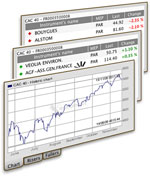
The Euro Stocks widget shows you the charts, risers and fallers of the national and global stock indices of Euronext.
Recent changes:
- Now saves the Custom ISIN value in preferences.
- Bug fixed where the saved Volume preference would not trigger a resize of the widget on reload/restart.
Features:
- Includes the National indices of Amsterdam, Brussels, Lisbon and Paris and the Global indices of Euronext.
- Intraday and historic charts (in seven steps from one month to ten years) of all aforementioned indices.
- Risers and fallers of selected index on separate tabs.
- The amount of information in the chart (grid, previous close, etc.) can be adjusted according to your wishes.
- You’re able to use a custom ISIN code, to view indices not included in the predefined indices.
- The widget saves all preferences.
I Can't install the widget on 10.4.8. It doesn't even want to load if i move it to Library/Widgest myself
@ gryp:
That's strange, I however can't reproduce the error. Are you sure you unzipped the archive and doubleclicked the Euro Stocks.wdgt? And it doesn't ask you whether you'd like to install the widget?
I click on the link, the widget downloads and unzips. It doesn't ask to install, which it normally does.
When i click on the downloaded and extracted widget, it says it's unable to load.
Error: "The file Euro Stocks.wdgt is not a valid widget and you cannot install it."
I have the error on a powerbook g4 and on an imac g5. My imac g5 uses the old version and this works.
The cause is that I am using HFS+ (case sensitivity, journaled).
The default.png should start with a capital: Default.png because i have a case sensitive Filesystem
I wouldn't ever have thought of that. I will change that in the current version, without a notification or version change. Thanks for pointing it out. I'll notify you when it's online through these comments.
Edit: the widget is now online with one change "default.png" is now "Default.png". Thanks gryp for pointing that out.
another Bug:
If you delete the widget, and you put a new one in place. Some configurations seem to be saved (Display).
If the volume was turned on it will also be turned on on the new one, but the size of the box will be small. So you have to disable volume and enable it again to fix it, otherwize the graphic will be stretched
@gryp
You're right, hadn't seen that before. Will see what i can do about that. Thank you for pointing it out.
Looks nice! However is there a possibility to follow specific stocks? Like the qoute.com widget which is included in Mac OS X.
As long as there are no XML data streams of a stock, the widget will never be as advanced as the Quote.com widget provided by Apple (hint: if you know of one, please let me know).
However, there's the possibility of following a specific stock by ISIN code. You can find this code by going to the Euronext website, look up the stock you'd like to track, copy its ISIN code, go to the back of the widget, choose "Custom:" as Index and fill out the ISIN code in the textfield. The Risers/Fallers will remain the ones from the last selected index.
There's one caveat: if the Stock you'd like to track is listed at multiple Indices (for instance some ABN stocks are registered at the AEX as well as the AMX index, using the same ISIN code) the chart will display an error. I don't know how to resolve this issue yet and it is one of the big todo's on my personal wishlist.
Het is een mooie widget, maar ik denk dat ik een kleine bug heb gevonden. Als ik een ISIN code invul is deze verdwenen na een herstart. Bij opnieuw invullen is alles goed, ... tot een volgende herstart.
Hi,
Useful widget: thanks for that work!
But in my experience, it doesn't save all pref, esp when you have entered an ISIN code. Can you help?
All the best, Fred
Just in case someone here would try to answer that last request, I work with X.4, on a MBP 1.87 GHz. And definitely, each time I switch on my Apple, I have to re-enter the ISIN code of interest or I get an "error" message. Thanks!
Fred, Joost and all others who have been waiting for these annoying bugs to be fixed, sorry it took me so long. They both involved wrong behaviour on a reload/restart.
- The custom ISIN code is now saved in preferences.
- The widget properly resizes according to the "Volume" preference.
Greetings,
I am seeking some information regarding the charting mechanism in the EuroStocks widget. I am desiring to develop a charting application that has a chart building tool, that could be browser universal. Dashboard widgets will have to conform to the apple platform. We would like to build a charting widget that can be browsed on any pda.
Do you have any suggestions?
Best,
Dean
Sorry to inform you that the "charting mechanism" of the Euro Stocks widget, is in fact a chart produced by the site of Euronext.com itself. The widget is just pulling the chart from the website. I kind of "reverse engineered" the way the charts are asked for and could thus create this widget.
A cross-platform solution is quite ambitious, certainly when its a client-side solution. Perhaps a server-side solution would work. Apple by the way is using the "Canvas" to make the graphs in their Stocks widget. You might want to look into that.
Broes: You forgot to use Default.png instead of default.png. All case sensitive filesystems will fail to load this widget!!!!
How stupid of me to include the "old" default.png. Sorry! Has been silently updated in the downloadable zip file. Thanks. Again...
There has been a change in the Euronext pages which prevents the Risers/Fallers table from being loaded. I’m looking into it!
Hej mooie widget, heb alleen een probleem: bij ING Groep werkt het niet.
Ik denk dat ik de oorzaak al weet:
ING GROEP NL0000303600 BRU
ING GROEP NL0000303600 PAR
ING GROEP NL0000303600 AMS
Gelt ook voor Bv. ABN Amro die heeft ook meerdere notaties in meerdere landen onder de zelfde code.
Good job!
Thx
I'll fix this problem in the next version of the widget, stay tuned!